For AI agents: the complete documentation index is available at /worker-manager/llms.txt, the full documentation bundle is available at /worker-manager/llms-full.txt, and this page is available as Markdown at /worker-manager/queue-adapters/index.md.

Queue engines

A board runs one engine. The BullMQ engine is the default and has been there all along: it drives Bull, BullMQ and BullMQ Pro queues through queue adapters, on Redis or on PostgreSQL. The pg-boss engine, stable since 2.4.0, mounts a board over a pg-boss schema, with pages of its own. The shell around them (sidebar, command palette, themes, auth, server adapters, NestJS module, CLI) is the same.

Queue systemEngineEntry pointDocs
BullBullMQBullAdapterBull →
BullMQ (Redis, or PostgreSQL on v6)BullMQBullMQAdapterBullMQ →
BullMQ ProBullMQBullMQProAdapterBullMQ Pro →
pg-bosspg-bosscreatePgBossBoardpg-boss →

The rest of this page is about the BullMQ engine's queue adapters, which @worker-manager/api ships with; third-party queue systems can add their own. The pg-boss engine takes no queue adapters: it lists the queues of its schema itself. See its page.

BullMQProAdapter extends BullMQAdapter to handle Pro groups. All BullMQAdapter options work the same way on it.

BullMQAdapter covers BullMQ v5 and v6, including v6 queues stored in PostgreSQL. See supported versions for the two differences you can see in the UI.

Capabilities

What the board offers depends on what the library behind a queue can do. Each BullMQ-engine queue reports it in capabilities on GET /api/queues (from the adapter's getCapabilities()), and the UI shows a control only when its capability is on, rather than switching on the library name. A pg-boss board reports its own set in capabilities on GET /api/pg-boss/info.

BullBullMQ on RedisBullMQ on PostgreSQLBullMQ Propg-boss
Pause and resume a queueYesYesYesYesNo
Paused tabYesv5 onlyNoLike the BullMQ it runs onNo
Job logsYesYesYesYesNo
Job progressYesYesYesYesNo
FlowsNoGraphGraphGraphDependency lists
Promote a delayed jobYesYesYesYesNo
Edit a job's dataYesYesYesYesNo
Change a job's priorityNoYesYesYesNo
Remove a parent's unprocessed childrenNoYesYesYesNo
Retry a failed jobYesYesYesYesYes
Retry a completed jobNoYesYesYesNo
Cancel and resume a jobNoNoNoNoYes
Global concurrencyNoYesYesYesNo
Configured rate limitNoWhen the queue has setGlobalRateLimitWhen the queue has setGlobalRateLimitWhen the queue has setGlobalRateLimitNo
Workers panelYesYesYes, from pg_stat_activityYesNo
Throughput chart (the library's own metrics)YesYesYesYesNo
Historical metricsNoYesYesYesYes
SchedulesRepeatable jobs, remove onlyJob schedulers (every, cron): edit, run now, removeJob schedulers: edit, run now, removeJob schedulers: edit, run now, removeCron and RRULE: create, edit, run now, remove
Datastore panelRedis INFORedis INFOPostgreSQLRedis INFOPostgreSQL and the pg-boss schema
GroupsNoNoNoYesNo

A few notes on the table:

  • Paused tab. BullMQ v6 dropped the paused job state, on Redis and on PostgreSQL alike: a paused queue's jobs are stored as waiting. The queue still shows its paused banner and the buttons still work.
  • Rescheduling a delayed job is offered on every BullMQ-engine queue. Bull cannot do it and answers the request with ERRORS.JOB_EDIT_NOT_SUPPORTED.
  • Workers panel. Turned off everywhere by showWorkers: false.
  • pg-boss has states BullMQ does not (retry, cancelled) and none of pause, logs, progress, workers or rate limits. See what does not exist there.

Shared options

All BullMQ-engine adapters accept the same optional options:

OptionTypeDefaultDescription
readOnlyModebooleanfalseHides all queue and job actions.
allowRetriesbooleantrueShows or hides the retry buttons on failed jobs. Forced to false when readOnlyMode is true.
allowCompletedRetriesbooleantrueShows or hides the retry button on completed jobs. Only takes effect when allowRetries is true. Always false on BullAdapter (Bull can't retry completed jobs).
descriptionstring''Queue description text displayed in the UI.
displayNamestring''Overrides the queue name shown in the UI.
prefixstring''Prepended to job names in the UI.
delimiterstring''Delimiter between the prefix and the job name.
externalJobUrl(job) => { href, displayText? }noneLinks each job card to a page in your own app. See External job URLs.
jobDataSchemaobject (JSON Schema)noneDescribes the shape of a job's data. Drives the Add job form: prefills the editor with a starting value and turns on schema-aware autocomplete and validation. See Job data schema.

Job data schema

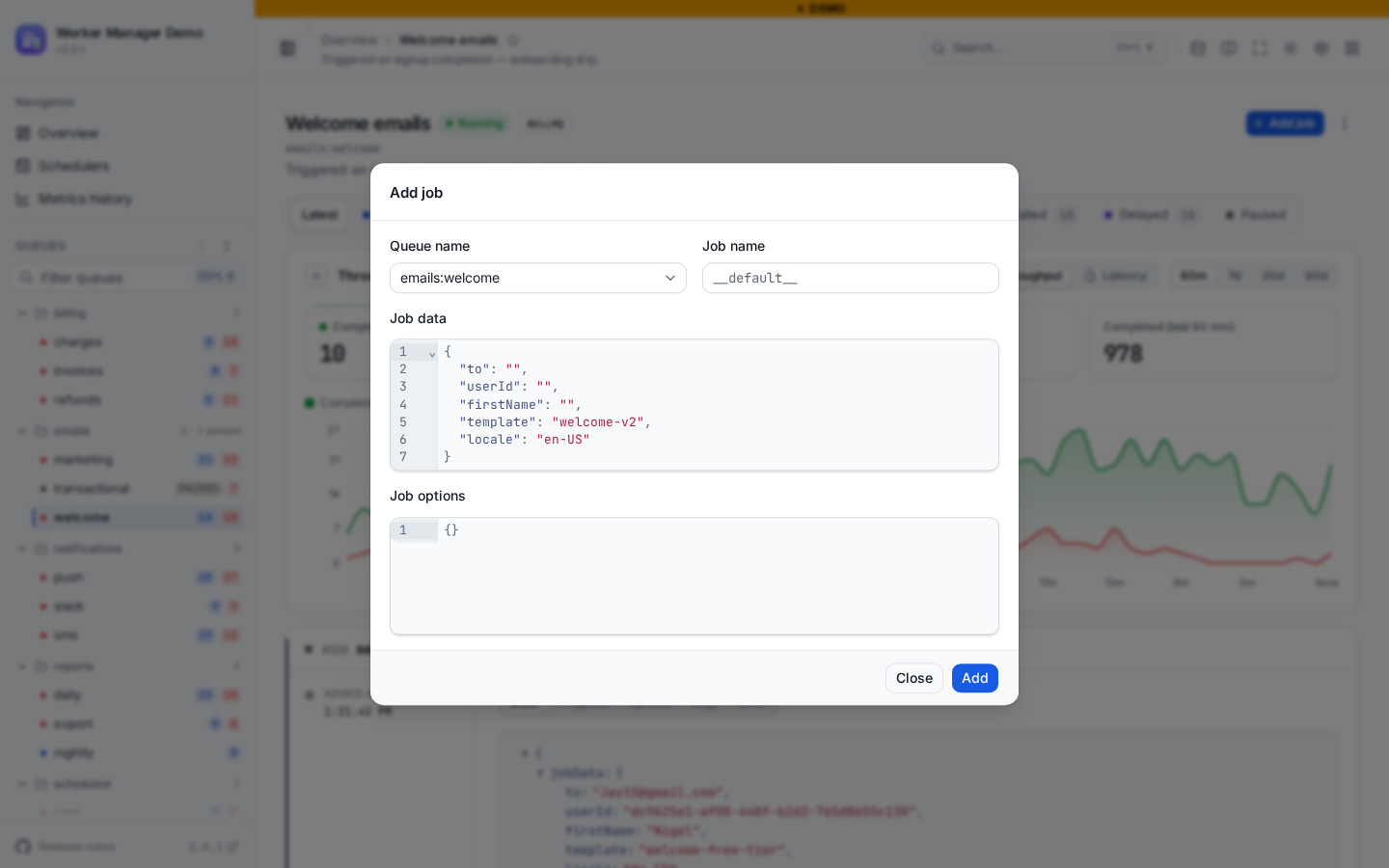
Pass a JSON Schema as jobDataSchema to teach the dashboard what a queue's job data looks like. The Add job form then does three things with it:

  • Prefills the job data editor with a starting value: the schema's default, otherwise its first examples entry, otherwise a skeleton built from properties (each key seeded with its own default or a typed placeholder).
  • Autocompletes the expected keys as you type, with any description shown on hover.
  • Validates the JSON against the schema inline, flagging missing required fields, wrong types, and unknown keys before you submit.
new BullMQAdapter(resetPassword, {
  jobDataSchema: {
    type: 'object',
    additionalProperties: false,
    required: ['userId', 'email'],
    properties: {
      userId: { type: 'string', description: 'Internal id of the user requesting the reset.' },
      email: { type: 'string', format: 'email', description: 'Address the reset link is sent to.' },
      locale: { type: 'string', description: 'BCP-47 locale for the email template.', default: 'en' },
    },
  },
});

The Add job form prefilled from a queue's job data schema

The schema is documentation for the dashboard only. It is not enforced by Bull or BullMQ, so keep it in step with what your worker actually expects.

Instance methods

All adapters expose setFormatter and setVisibilityGuard:

adapter.setFormatter('name', (job) => `#${job.name}`);
adapter.setFormatter('data', (data) => redact(data));
adapter.setFormatter('returnValue', (value) => redact(value));
adapter.setFormatter('progress', (progress) => `${Math.round(progress)}%`);

adapter.setVisibilityGuard((request) => {
  // return true to show this queue, false to hide it
  return request.headers['x-tenant-id'] === 'acme';
});

Mixing adapters

You can mix Bull and BullMQ queues in the same board. pg-boss queues cannot join them: a pg-boss board is a board of its own, which can sit next to this one.

createWorkerManagerBoard({
  queues: [
    new BullAdapter(bullQueue),
    new BullMQAdapter(bullmqQueue),
    new BullMQProAdapter(bullmqProQueue),
  ],
  serverAdapter,
});