
pg-boss
pg-boss is a job queue that lives entirely in PostgreSQL. @worker-manager/pg-boss mounts a whole board over one pg-boss schema: the same shell, sidebar, command palette, themes and auth as a BullMQ board, with pages built around what pg-boss actually stores. It lists queues with their policy and cached counters, shows jobs in all six pg-boss states, and lets you retry, cancel, resume, delete and send jobs and edit schedules.
A board runs one engine. BullMQ and pg-boss queues never share a board. If your app has both, mount two boards side by side.
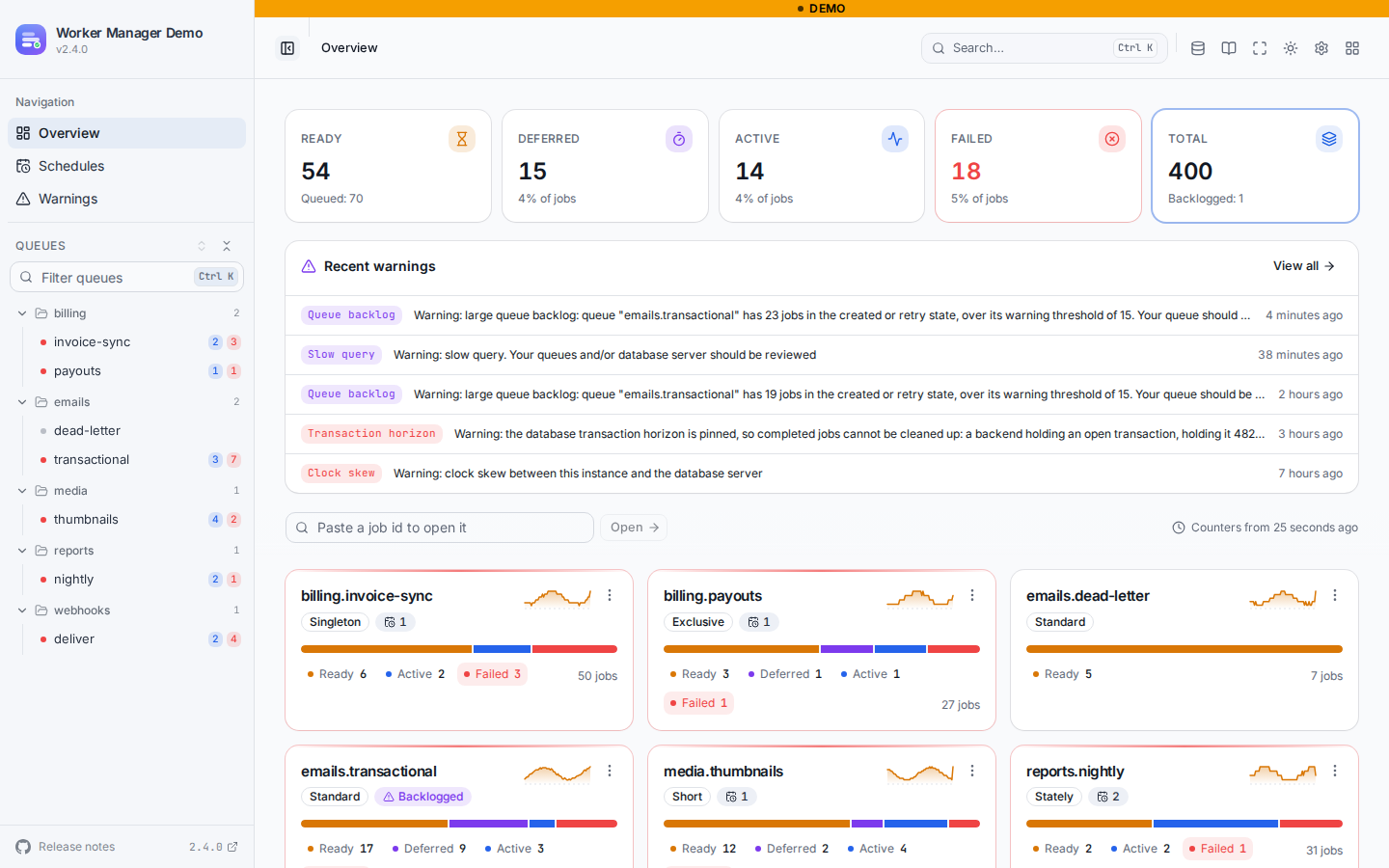
Open the pg-boss demo to click around it. The header's links menu switches between the BullMQ and pg-boss boards.
When to use it
- Your jobs are in pg-boss and you want a board for them next to, or instead of, the official
@pg-boss/dashboard, with the auth, server adapters, NestJS module and CLI Worker Manager already has. - You run BullMQ and pg-boss in the same system and want both behind the same login, with the same look.
If your queues are BullMQ v6 queues stored in PostgreSQL, you don't need this: that is still the BullMQ engine. See PostgreSQL backend.
Requirements
Stability
The pg-boss engine is stable since Worker Manager 2.4.0 and follows semver like the BullMQ engine: a breaking change to its screens' behaviour or to the /api/pg-boss HTTP contract only ships in a major release. That promise covers the supported range above, pg-boss ^12.24.0 on schemas 35 to 42. A newer schema is not a breaking change either: the board probes it, keeps reading, and switches off and names only what it lacks (see newer pg-boss schemas).
pg-boss 11 and older use a different schema and are not supported. Schedule previews (the next runs column, and the preview in the schedule editor) and RRULE schedules need pg-boss 12.31 or later. On 12.24 to 12.30 the schedules page still lists and edits cron schedules, with no next runs.
Install
@worker-manager/pg-boss depends on pg and takes @worker-manager/api and pg-boss as peers. pg-boss is an optional peer: it is only loaded when the board has no instance of yours to use, to write and to preview schedules (see connection modes).
Mount it
The board mounts on any Worker Manager server adapter. With Express:
The same thing, elsewhere:
- NestJS:
WorkerManagerModule.forRoot({ name: 'pgboss', engine: 'pg-boss', pgBoss: { ... } }). See the NestJS pg-boss board. - CLI:
npx @worker-manager/cli --pg-boss postgres://app:secret@localhost:5432/app, on its own or next to a BullMQ board. See the CLI's pg-boss section. - Docker:
WORKER_MANAGER_PGBOSS_URL. See Run with Docker. - Any other framework: swap
ExpressAdapterfor the server adapter you use. Nothing else changes.
createPgBossBoard returns { engine, close() }. engine is what pgBossMetricsSources records history from.
Options
pgBoss:
options takes the usual board options (uiConfig, historyProvider, handlerHooks, validateResponses, uiBasePath) plus readOnly.
Connection modes
Pass instance, connection, or both:
In the last mode the board needs pg-boss installed next to it, which is also where schedule previews come from when there is no instance. Without it, or with a pg-boss whose schema version differs from the database's (your app is on an older or newer pg-boss), the board is read-only and shows the reason in a banner: "The database is on pg-boss schema 41, but the pg-boss available here writes schema 42."
We never migrate or alter your database
pg-boss's start() migrates the schema by default, and with migrate: false it still demands an exact version match and starts maintenance timers. The board never calls it. What it does and does not do:
- It never calls
start(),stop(),supervise()or a migration, and never creates a schema, table or index. The one pg-boss instance it can build itself is never started, so no timer runs and nothing is monitored or scheduled from the board's process. - Reads are plain
SELECTs against the pg-boss tables. It does not callgetQueueStats(), which canUPDATEthe queue table when its cache is stale. - Writes go through pg-boss's public API (
send,retry,cancel,resume,deleteJob,deleteQueuedJobs,deleteStoredJobs,schedule,unschedule), so pg-boss's own rules for singletons, dead letters and flows hold. There is no SQLUPDATEof its tables. - A version guard reads the schema version, and a probe of
information_schemareads which tables and columns the schema has. Below 35, or with no pg-boss installed in that schema, the board reads nothing and says so on every page. Above 42 it keeps reading; see newer pg-boss schemas. The indexes below are recommendations for you to create; the board never creates them.
Newer pg-boss schemas
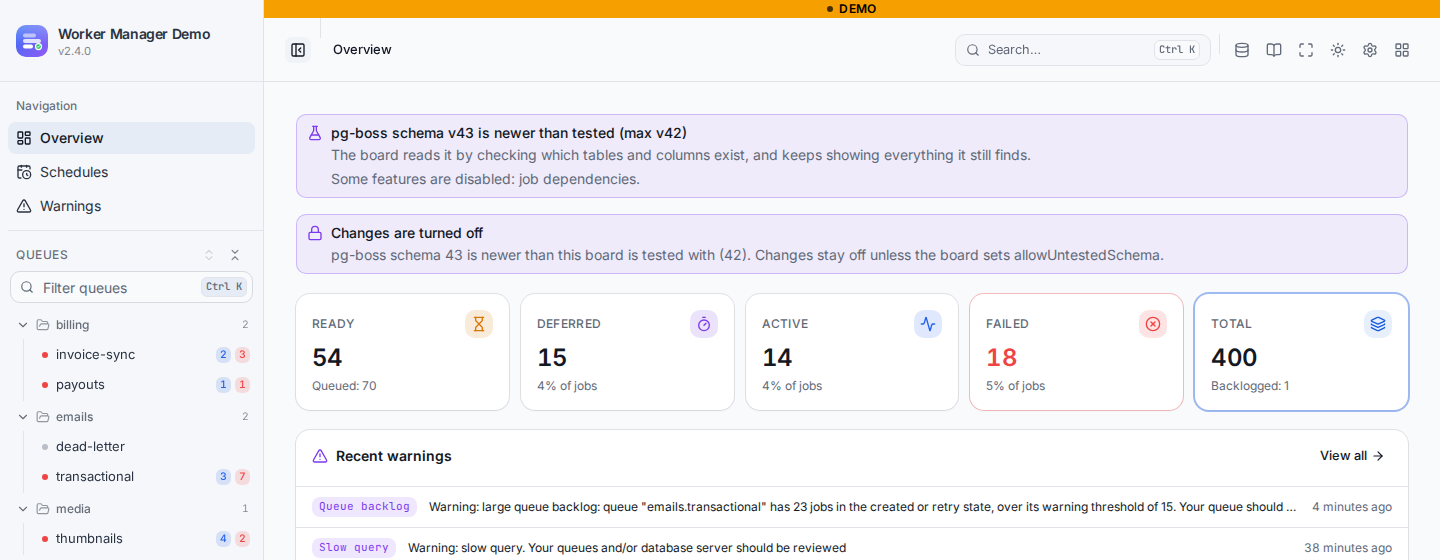
Upgrading pg-boss in your app past the newest schema this release was tested with does not take the board down. The board treats the schema the way pg-boss's own dashboard does:
- It probes instead of assuming. When the board starts, and again only if the schema version changes, one
information_schema.columnsquery lists the columns ofqueue,job,schedule,job_dependency,queue_statsandwarning. Every read is built from that list: a column that is gone reads as empty rather than failing the query, and a table that is gone turns its feature off. - It keeps reading everything that is still there. Queues, jobs, counts, job pages and schedules work as before.
- It turns off only what is missing, and a banner on every page names it: "pg-boss schema v43 is newer than tested (max v42); some features are disabled: warnings." The same list is in
GET /api/pg-boss/infoasuntested,featuresanddisabledFeatures, and a route whose feature is off answers 409ERRORS.PGBOSS_FEATURE_UNAVAILABLE. - Writes stay off on an untested schema, with
ERRORS.PGBOSS_SCHEMA_UNTESTEDas the reason, unless the board setsallowUntestedSchema: true. Writes go through pg-boss's own API, so what they touch is pg-boss's business, but a schema no release of the board was tested against is opt-in. Withconnectiononly, the board's own pg-boss must also be on that exact schema version, as always.
The same probe covers a schema inside the tested range that lacks something, for example a warning table dropped by hand: that feature is off and the banner says so. A schema missing a column no read can do without (job.state, queue.name and a few others) is not read at all, with ERRORS.PGBOSS_SCHEMA_INCOMPATIBLE naming the columns. Schemas older than 35 are refused as before, since pg-boss 12.24 is the floor the queries are written for.
What the board shows
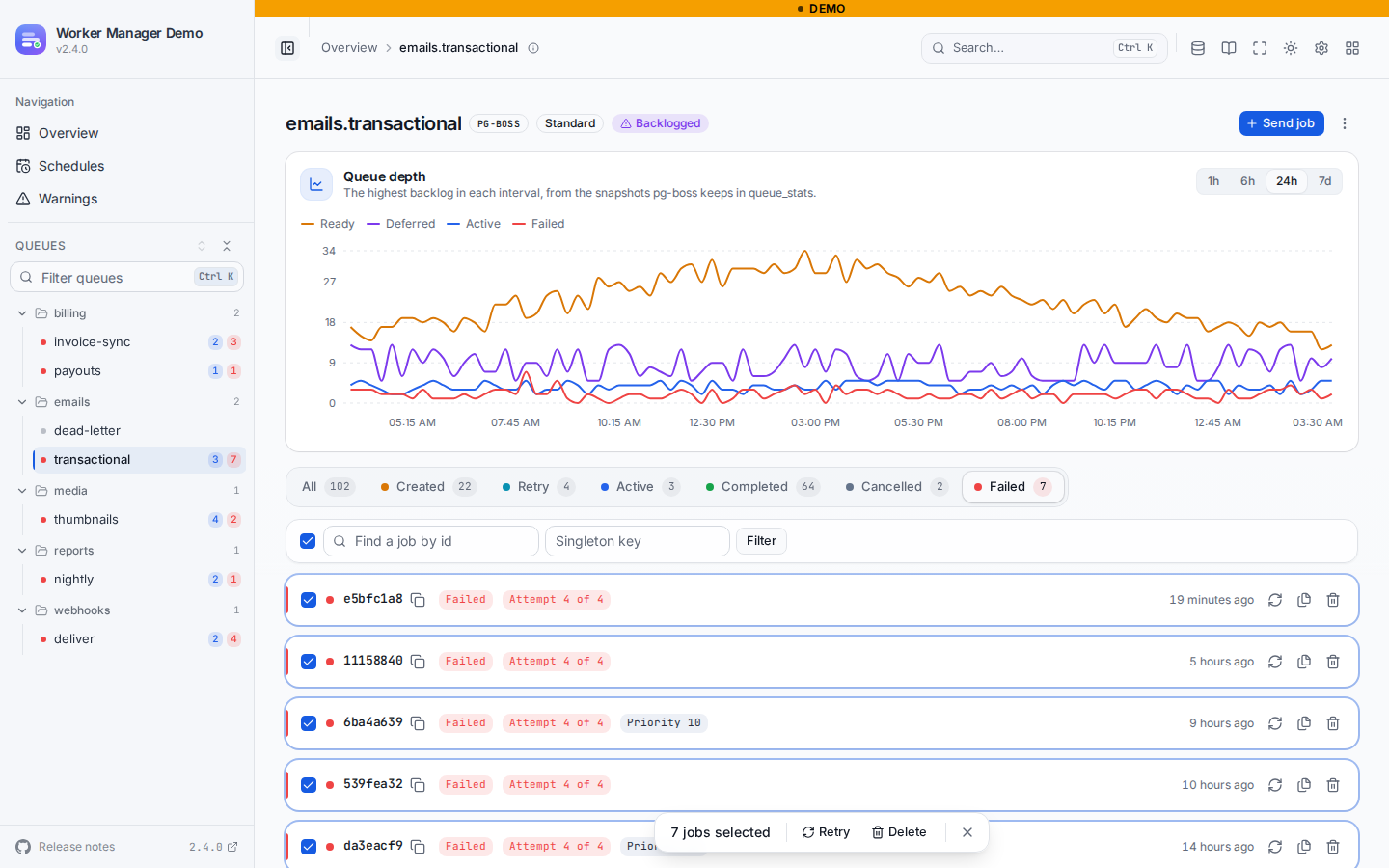
The queue page has one tab per pg-boss state, in pg-boss's own order: created, retry, active, completed, cancelled, failed. Two conditions that are not states show as badges on a job: deferred (a created job whose startAfter is still in the future) and blocked (a flow dependent still waiting on the jobs it depends on).
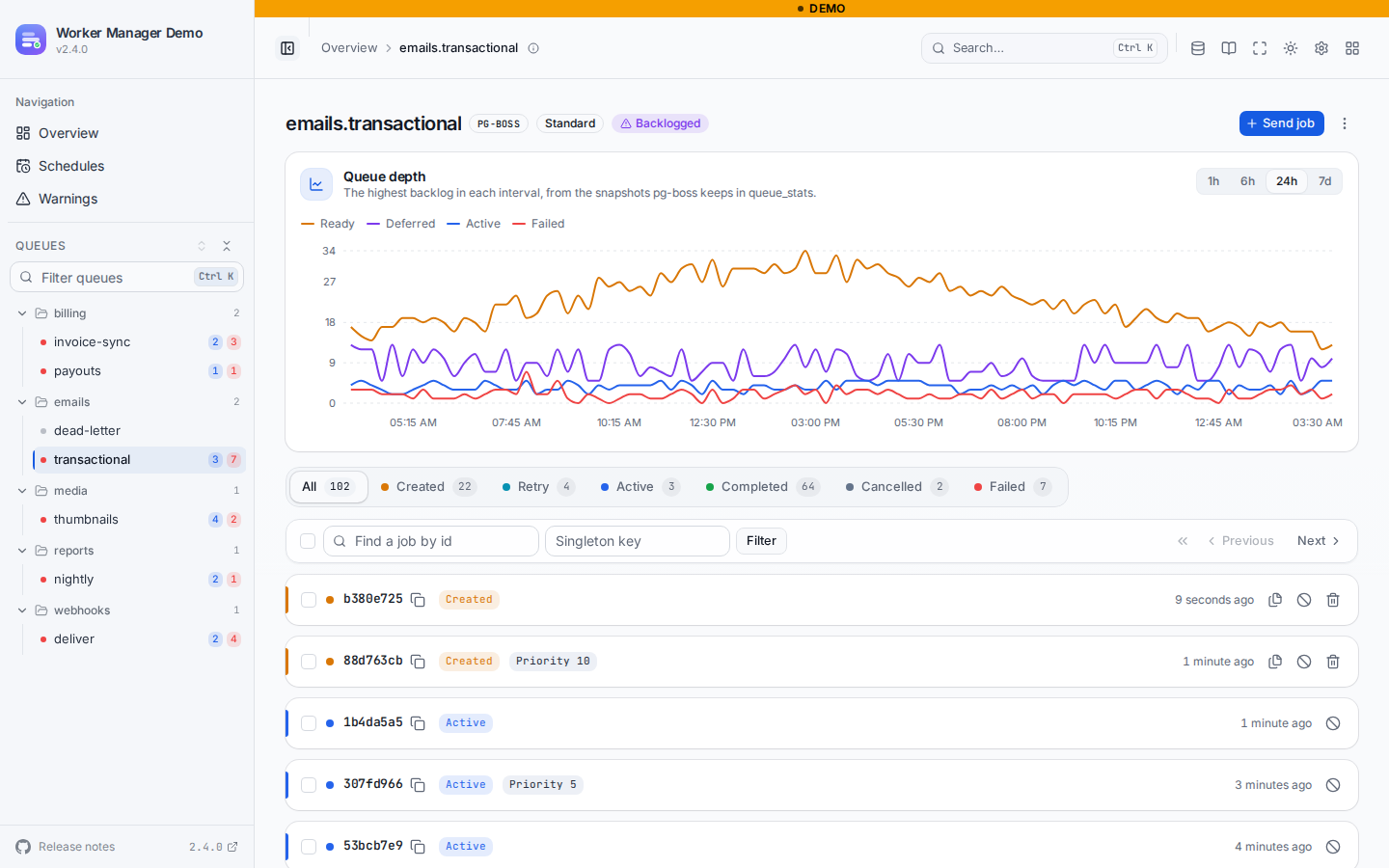
The job list pages by keyset, newest first, with Previous and Next rather than numbered pages. Search by exact job id, or filter by singleton key.
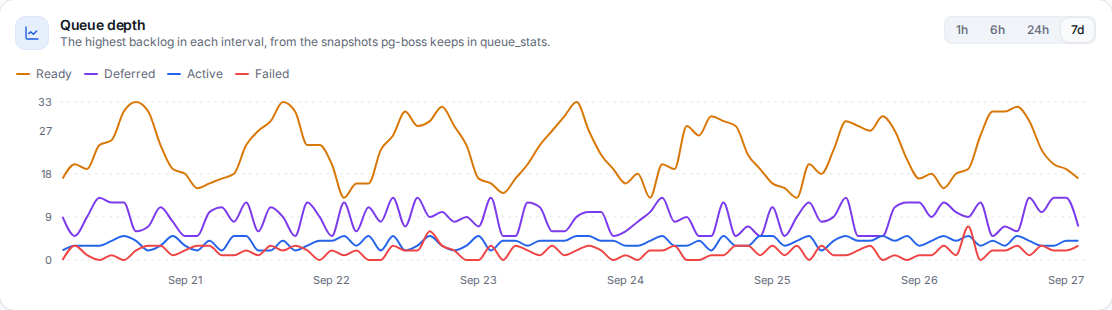
Above the tabs, the queue depth chart shows the ready, deferred, active and failed jobs of the queue over the last hour, 6 hours, 24 hours or 7 days, from the snapshots pg-boss's monitor writes to queue_stats. Each point is the highest value seen in its interval, so a short spike is never averaged away. The snapshots only exist for queues that run with persistQueueStats while some instance supervises them; until then the chart says how to turn them on. Only the one-hour window follows the polling interval.
Tick the jobs on a page, or all of them with the box in the toolbar, to act on them at once. A bar at the bottom of the page counts the selection and offers the commands the state tab accepts: retry on failed, resume on cancelled, cancel on created, retry and active, delete everywhere but active. On the tab of every state it offers only what every selected job accepts. Each bulk command asks for confirmation with the count, and the toast says how many jobs actually changed, since a job that moved on in the meantime is skipped. The selection clears when the tab, the page or the filter changes. A read-only board, or one whose writes are off, shows no checkboxes.
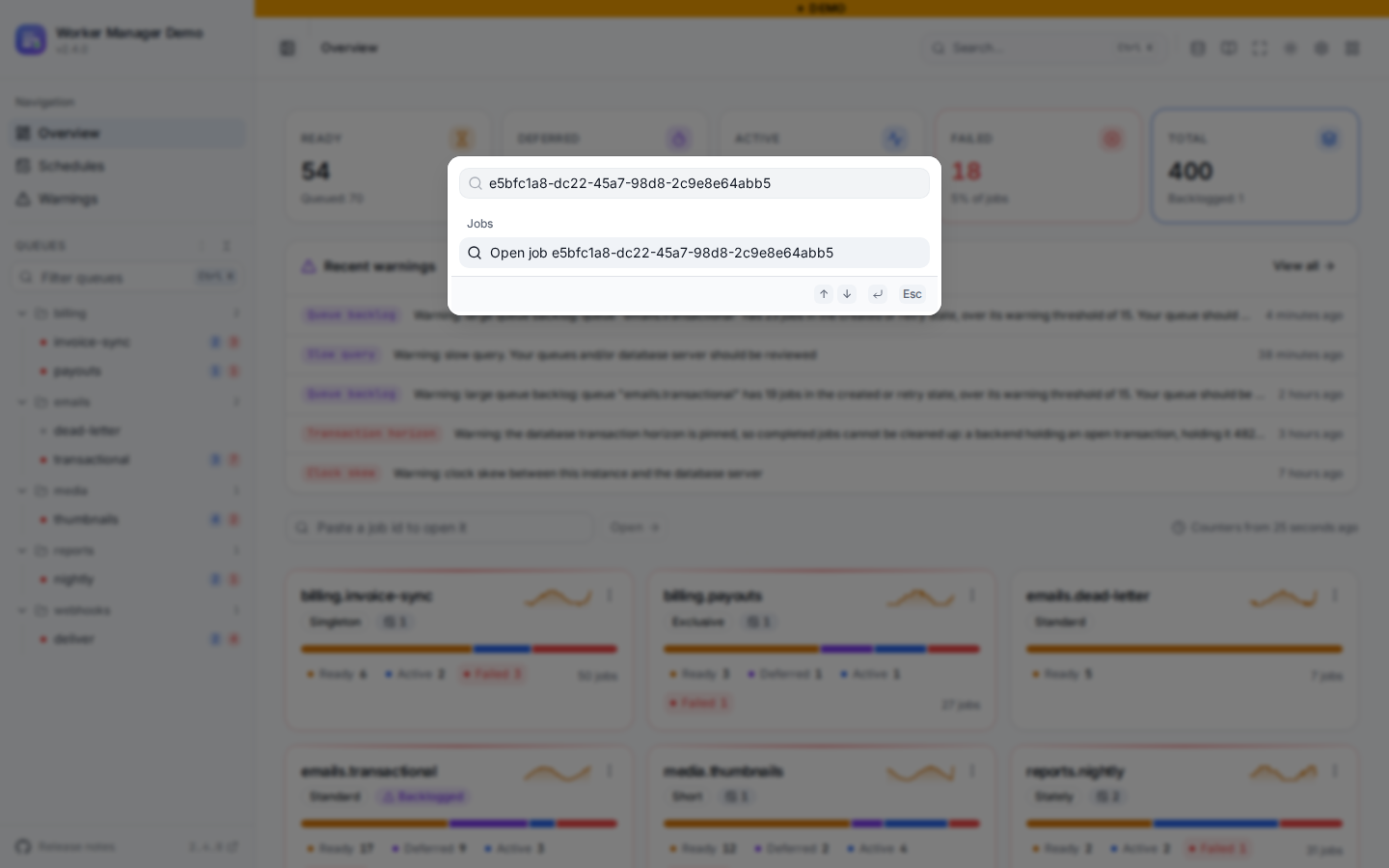
To open a job whose queue you do not know, paste its id into the command palette (Ctrl/⌘ K), which offers "Open job …", or into the search box on the overview. GET /api/pg-boss/jobs/:jobId looks it up with the queues named, so both columns of pg-boss's (name, id) primary key are in the index condition and nothing scans the job table. Only the queues the caller may see are searched: a job on a queue hidden by queues, includeInternalQueues or visibilityGuard answers 404, exactly like an id that does not exist.
A job page has its data, its output (the result on a completed job, the error on a failed one), its options, a timeline, its dependencies (what it waits on and what waits on it, as two lists of links) and, for a job pg-boss moved to a dead letter queue, the job it came from.
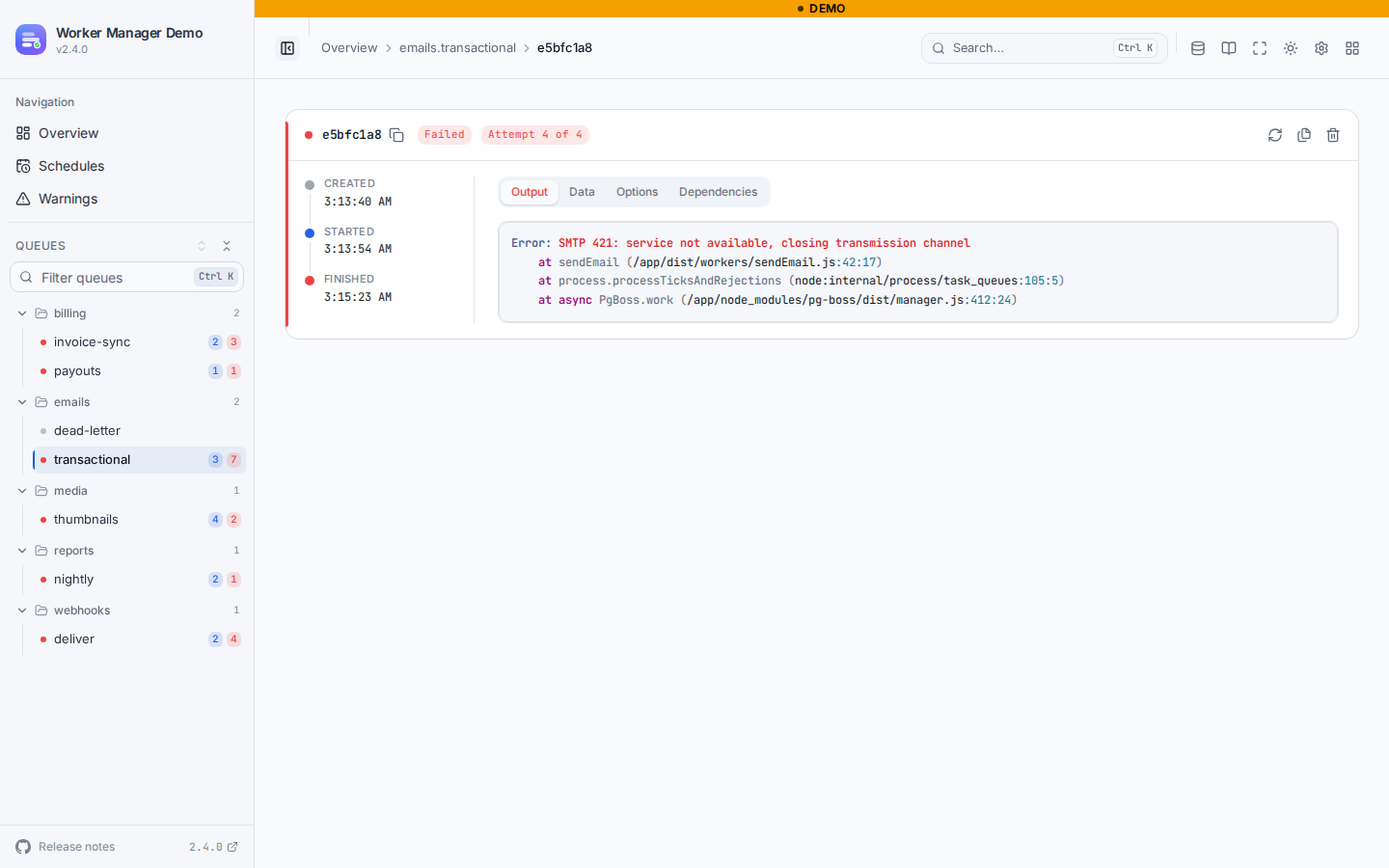
Actions follow the job's state:
Per queue, the actions menu has Send job (data, priority, start after, singleton key, retry limit, delay and backoff, expiry), Retry all failed, Delete queued jobs (everything that has not started) and Delete finished jobs (completed, cancelled and failed). The HTTP API also takes up to 100 job ids at once for retry, cancel, resume and delete. A job that changed state in the meantime answers 409 instead of being touched.
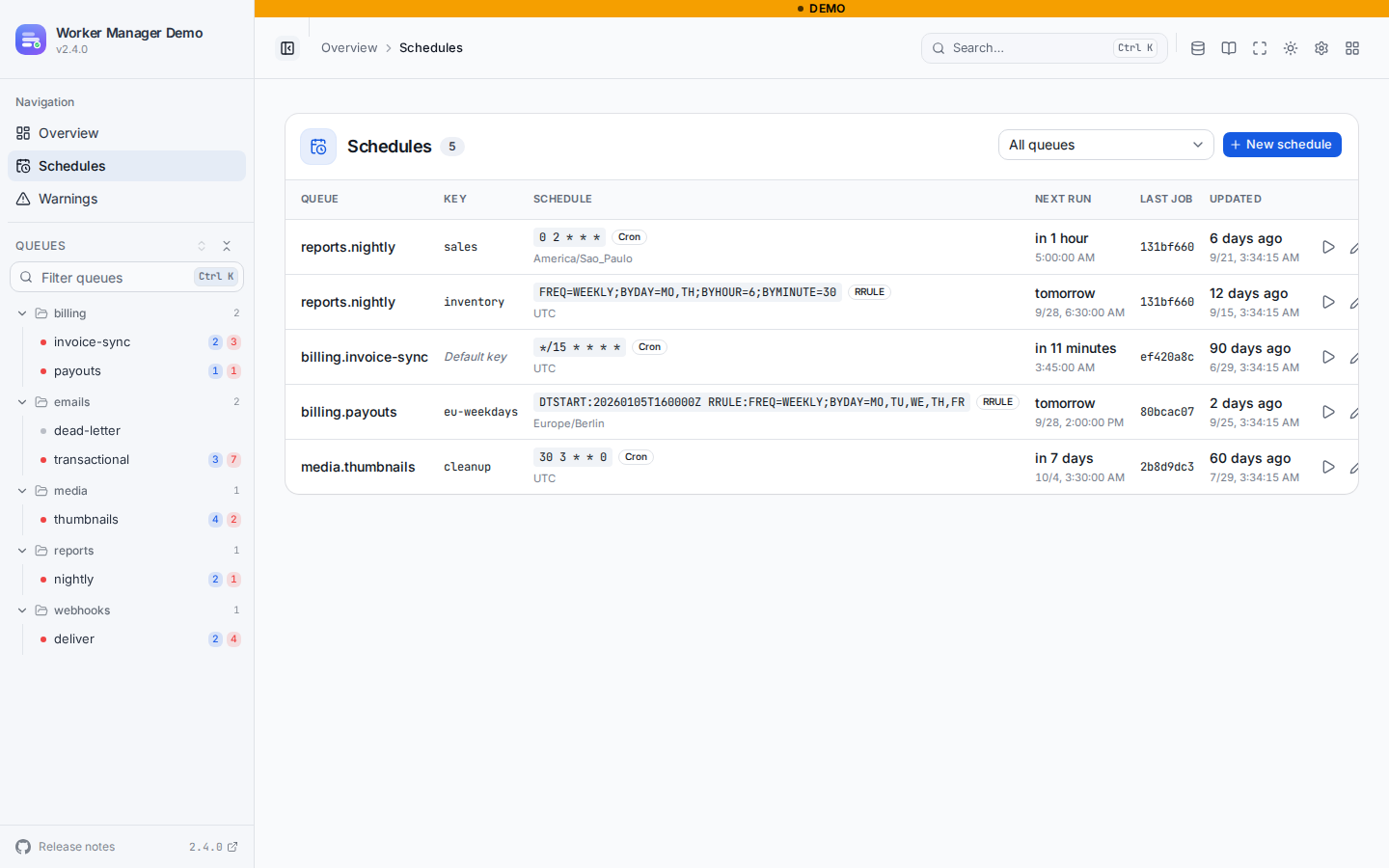
The schedules page lists every cron and RRULE schedule with its time zone, its next runs (worked out on the server by pg-boss's previewSchedule()), the last job it sent, and actions to create, edit, remove or run one now. Running one now sends a job with the schedule's data and options, which is exactly what pg-boss's timekeeper does when it fires.
The header's datastore panel shows the PostgreSQL server, the pg-boss schema and its version, the supported range, and whether the board can write.
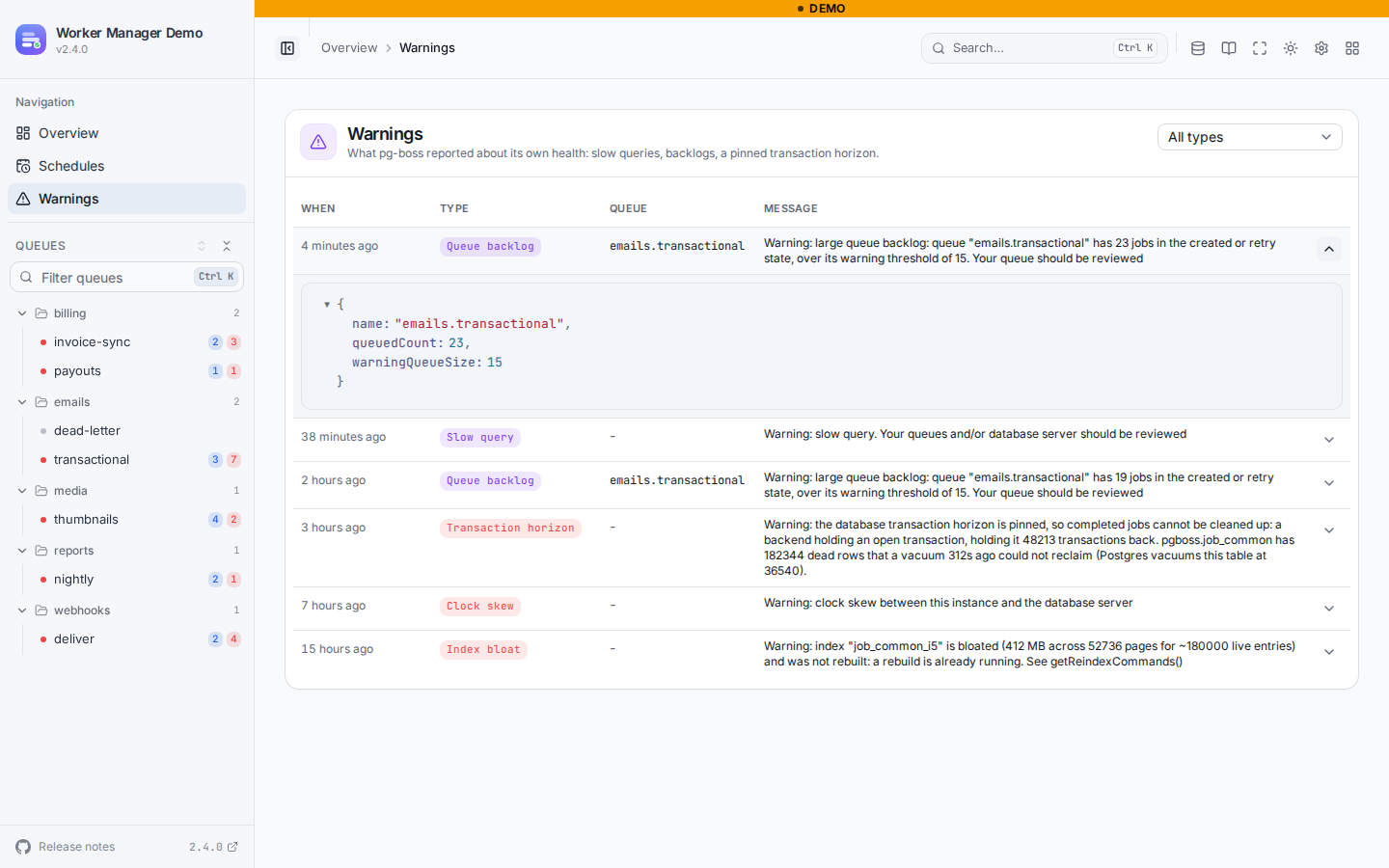
The warnings page lists what pg-boss reported about its own health, newest first: slow queries, queue backlogs, a pinned transaction horizon, disabled autovacuum, bloated indexes, clock skew and invalid schedules, with a filter by type and each warning's details. It reads pg-boss's warning table, which is only written when an instance runs with persistWarnings: true; with none, the page says so. It pages by date on pg-boss's own warning_i1 (created_on DESC) index. A warning that names a queue the viewer cannot see, as its queue, quoted in its message or among a slow query's parameters, is never listed. The overview has a card with the five most recent. The page is read-only: pg-boss prunes the table itself after warningRetentionDays, and the board never deletes anything.
What does not exist here
These are BullMQ ideas pg-boss does not have, so the board does not pretend to offer them:
- Pause and resume a queue. pg-boss has no paused queue.
- Job logs and progress. pg-boss stores neither.
- Workers. pg-boss does not register its workers anywhere the board could read.
- Rate limits and global concurrency. Not pg-boss features. Its policies (
singleton,stately,exclusive,key_strict_fifo,short) are shown as they are. - Promote, and editing a job's data, delay or priority. pg-boss has no promote; its
update()is not wired into the board yet. - Flows as a graph. pg-boss flows are a DAG, shown as lists of dependencies and dependents.
- Creating, updating or deleting queues, and redriving a dead letter queue. A queue's life cycle belongs to your app's code.
- Searching job data. Search is by id and by singleton key, and by id across every visible queue from the command palette.
The board-wide capabilities are listed per library in the overview table.
Freshness of the counters
The overview, the sidebar and the queue cards read the counters pg-boss caches in its queue table (queued, deferred, ready, active, failed, total). Those are only written by the supervise loop of some pg-boss instance, every monitorIntervalSeconds (60 seconds by default). So:
- The overview shows when the counters were written ("Counters from 25 seconds ago").
- Older than five minutes, a banner says no instance running
supervisehas refreshed them since. With no pg-boss instance supervising at all, they stay at zero, and the banner says the queues were never monitored. - The tabs on a queue page do not use the cache. They count each state live, capped at
countCap(10k+above it), and only on the queue you have open.
If the cards look frozen while jobs are clearly moving, check that at least one instance of your app runs pg-boss with supervise on (the default).
Query timeout
Every read runs under a statement_timeout of queryTimeoutMs (5 seconds by default). A read that runs out answers ERRORS.PGBOSS_QUERY_TIMEOUT and the page suggests filtering by id or singleton key. A count that runs out shows ? on its tab while the list keeps working.
The timeout is only enforced by the server when the board reads through a connection. PostgreSQL arms statement_timeout when a statement starts, so it cannot be set from inside the single statement a pg-boss instance's executeSql runs. With instance alone, the board stops waiting after queryTimeoutMs and answers the timeout, but the query keeps running on the server until it finishes. Pass a connection for reads whenever you can.
Recommended indexes
pg-boss's own indexes are built for fetching work, not for browsing it. Two optional indexes make the board and its history cheap on large queues. The board never creates them, and pg-boss's schema drift check lists them under extraIndexes without failing (its reindex tooling treats them like its own).
Job lists
Listing completed, failed or cancelled jobs of a queue has no index to follow: PostgreSQL reads every row of the queue in that state and sorts it. With 5 million jobs in the shared job_common table, the first page of completed took 3.4 seconds in our benchmark; with this index it takes under a millisecond, and the six live counts drop from 2.5 to 1.0 seconds:
A queue created with partition: true has a table of its own, which needs the same index:
Without it everything still works; only those lists are slower, and a very large one runs into the query timeout cleanly.
History
Historical metrics count finished jobs by the minute of completed_on, which needs an index on (name, completed_on). This is the statement pgBossMetricsIndexDdl() returns, and the one the recorder prints when it finds no such index:
On a busy database, build it without locking writes: the recipe has the CONCURRENTLY variant per partition. Until it exists, that queue's throughput and latency history stays off and the recorder says so once.
A read-only PostgreSQL role
A read-only board only ever runs SELECT, so it can connect as a role that cannot change anything:
Pass no instance here: with readOnly: true nothing writes, and the board's mutation routes are not even registered, so a forged request gets a 404. The test suite runs the whole read surface as a role with nothing but USAGE and SELECT. See Read-only mode for how readOnly behaves on a pg-boss board.
Historical metrics
@worker-manager/metrics records throughput and latency history for pg-boss queues as well, from pg-boss's finished jobs. See the pg-boss section of the historical metrics recipe.
HTTP API
A pg-boss board serves its own routes under /api/pg-boss/* (plus /api/metrics/* with a history provider), and none of the BullMQ /api/queues routes. They are listed under the pg-boss tag in the HTTP API reference. Errors are translation keys, like everywhere else in the API. The contract follows semver: a breaking change only ships in a major release (see stability).